
Podrobnosti najdete v našich zásadách ochrany osobních údajů.
Při setrvání na stránce potvrzujete, že jste byli informováni o technologiích používaných na naší stránce.
Nechcete-li, aby se tato zpráva dále zobrazovala, klikněte na tlačítko níže.

Pro Domácnost
- Domácí Wi-Fi Systém
- Monitorování Kvality Ovzduší
- Bezdrátové Routery
- Wi-Fi Extendery
- Access Pointy
- Wi-Fi Bridge
- Bezdrátové Adaptéry
- PowerLine
- Automatizace Domácnosti
- Projekční Systém
- Síťové Kamery
- Switche
- ADSL Modem Routery
- 3G Routery
- Síťové Adaptéry
- Print Servery
- KVM Swtiche
- Wi-Fi Antény
- Starší Produkty
- Bezdrátové Routery
- Wi-Fi Extendery
- Bezdrátové Adaptéry
- Přístupové Body
- Kabelové Širokopásmové Routery
- ADSL Modem Routery
- 3G Routery
- Síťové adaptéry
- Síťové Kamery
- Switche
- Print Servery
- Huby / USB Huby
- Multimediální zařízení
- Konvergence / IP Telefonie Huby
- Projector Server
- NAS
- Bluetooth Adaptéry
- Ethernet Network Access Controller
- Wi-Fi Antény
- WLAN Kabely a Příslušenství
- Ostatní
- No Power Adapter or Software Required
- High Video Resolution supports up to 1920 x 1440 pixels
- Supports up to 250MHz Bandwidth
- Supports Microsoft Intellimouse, Optical Mouse, Intellimouse explorer, Logitech Net Mouse etc.
- Support DOS, Win3.X, Win95/98/98SE/ME/XP/2000/NT/Vista/7, Netware, Unix, Linux
- Hot Plug - Add or Remove PCs for Maintenance Without Powering Down the KVM switch or other PC
- PC selection via Hot Keys and/or hardware Switch Button
- Auto Scan Mode for Monitoring PCs
- Keyboard Status restored when Switching PCs
- LED Display for Easy Status Monitoring
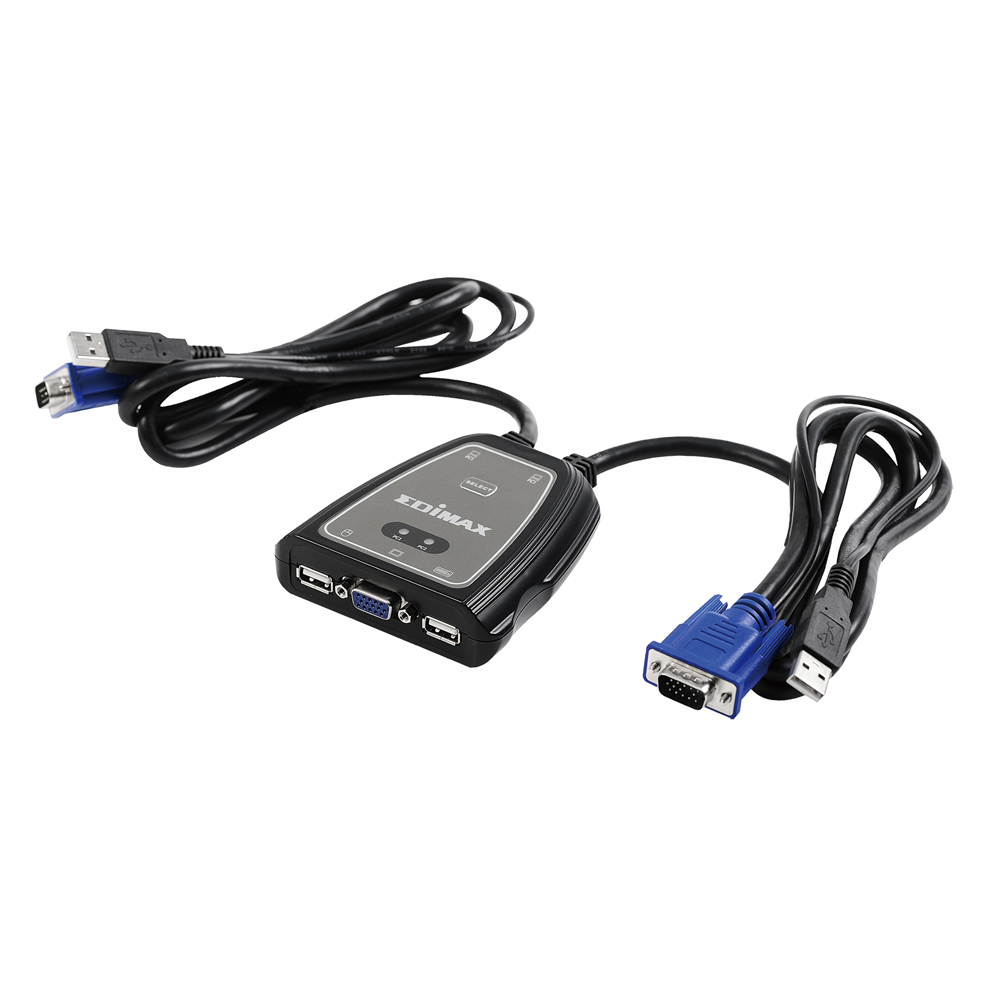


What's a KVM switch anyway? Lets say you have two computers with, for instance, different Operating Systems (OS) on them: a KVM switch allows you to control both from one computer screen, keyboard and mouse. The Edimax EK-2U2C Slim Desktop KVM Switch is compact and designed specifically for individual and SOHO use.
The Edimax EK-2U2C has built-in USB ports for both the PC side and the console (KVM) side, allowing you to use a USB keyboard and mouse. It also includes 2 built-in cables to connect to your computers. The Edimax EK-2U2C KVM switch supports hotkeys, so you can switch between computers by using the hardware switch on the device or by pressing the hotkeys on your keyboard. High resolution (1920 x 1440) support easily allows full HD quality. It also features push button and auto scan functions, and features complete keyboard and mouse emulation for a simultaneous PCs boot-up process. A “Hot Plug” feature lets you connect and disconnect to and from PCs without powering them down.
The Edimax EK-2U2C will save you money, space and equipment. You won't need additional power supply or software either; you can simply plug and play.
Schemat połączenia

| Max. PC Connections | 2 |
| Display LED | 2 |
| PC Port Connector | HD-15M x2, USB A type x2 |
| Console Port Connector(Female) | HD-15F x1, USB A type x2 for Keyboard & Mouse |
| PC Selection | Hot Key / Switch button |
| Cable | 2x 1.2 meters VGA HD-15F, USB A |
| VGA Resolution | 1920 x 1440 |
| Scan Intervals | 5,10,15,20,25,30s |
| Housing | Plastic |
| Bandwidth | 250MHz |
| Humidity | 0~90% (Non-Condensing) |
| Operation Temperature | 0~40°C |
| Dimension | 130 x 76 x 43mm |
| Weight | 320g |
* Specifikace a design se mohou změnit bez předchozího upozornění.